
 11
11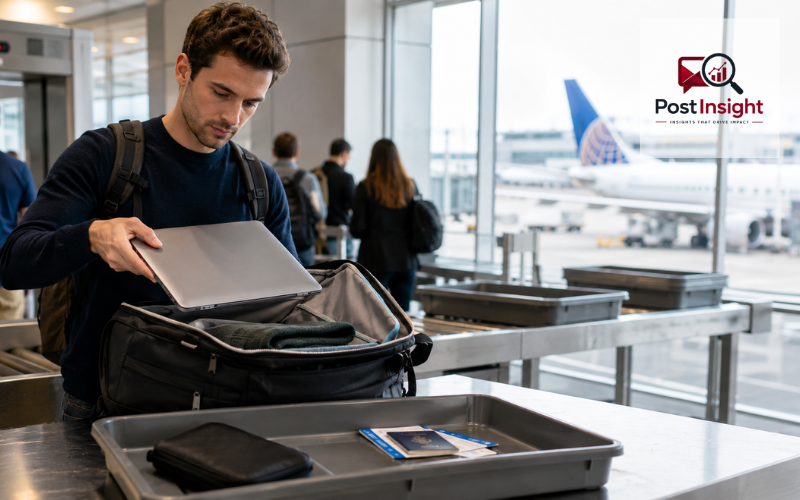
If you are searching for “can you bring a laptop on,” you are most likely asking whether a laptop is allowed on a plane, how it should be packed, and what airport security expects from travelers. The simple answer is yes, you can bring a laptop on a plane. In most cases, airlines and airport security allow laptops in carry-on bags, personal bags, and sometimes checked baggage.
However, the safest and most practical choice is to keep your laptop with you in the cabin. A laptop is valuable, fragile, and powered by a lithium-ion battery, so it is better protected when it stays in your carry-on or personal item. Official battery guidance also says devices such as laptops should be carried in carry-on baggage, and if they are packed in checked baggage, they must be fully powered off and protected from damage.
This guide explains everything in simple language, including carry-on rules, personal bag rules, airport security screening, checked baggage risks, battery limits, international travel, Wizz Air considerations, and how to pack your laptop before you fly.
| Travel Question | Quick Answer |
| Can you bring a laptop on a plane? | Yes, laptops are allowed on most flights. |
| Best place to pack it | Carry-on bag or personal item. |
| Can it go in checked baggage? | Sometimes yes, but it is not recommended. |
| Do you remove it at security? | Usually yes, unless the airport uses newer scanners or special screening. |
| Is a laptop case required? | No, but a padded sleeve is safer. |
| Can you bring more than one laptop? | Usually yes, if your bag follows airline size and weight rules. |
| Can you use it during the flight? | Usually after takeoff, when the crew allows electronic devices. |
Yes, you can bring a laptop on a plane. Travelers commonly carry laptops for work, study, entertainment, remote jobs, business meetings, and personal use. A laptop is considered a normal portable electronic device, so it is not banned from air travel.
Airport security mainly cares about two things: whether the laptop can be screened clearly and whether the battery is safe for travel. That is why you may be asked to remove your laptop from your bag at security and place it in a separate bin. TSA guidance for laptops says they are allowed, but travelers may need to remove them from their bags for X-ray screening, while TSA PreCheck passengers usually do not need to remove laptops.
The purpose of your laptop usually does not matter. Whether it is your work laptop, school laptop, gaming laptop, or personal device, you can usually bring it as long as it follows airline baggage size rules and battery safety limits.
Yes, you can bring a laptop on a plane carry on, and this is usually the best option. Keeping your laptop in your carry-on bag gives you better control over it during the trip. It is less likely to be damaged, lost, or stolen compared with checked baggage.
When packing your laptop in a carry-on, place it in an easy-to-reach section of the bag. This helps if airport security asks you to remove it for screening. Avoid burying it under clothes, shoes, books, or food items because that can slow you down at the checkpoint.
A padded laptop sleeve inside your carry-on is a smart choice. It helps protect the screen, corners, and body of the laptop from pressure or scratches. Before going to the airport, check your airline’s cabin bag size and weight limits. Some airlines are strict about carry-on dimensions, especially budget airlines, so your laptop bag and main cabin bag should match the ticket type you purchased.
Yes, you can bring your laptop on a plane in your personal bag, as long as the bag fits the airline’s personal item size rules. A personal bag can be a backpack, small laptop bag, handbag, messenger bag, or slim under-seat bag.
For many travelers, the personal item is the best place for a laptop because it stays under the seat in front of you. This means you can access it more easily during the flight if laptop use is allowed. It also reduces the chance of someone moving or pressing your bag in the overhead bin.
The important point is that your laptop bag may count as your personal item. If your ticket includes only one small personal item, and you bring a separate laptop bag plus another backpack, the airline may treat that as extra baggage. Always check your airline’s rules before flying, especially if you are traveling on a low-cost ticket.
Yes, you can bring a laptop on a plane without a case. Airport security and airlines usually do not require a laptop case. However, traveling without any protection is not the best idea.
Airports are busy places, and bags are often moved quickly. A laptop without a case can easily get scratched, bent, or damaged if it is placed beside chargers, keys, bottles, books, or other hard items. Even a small amount of pressure on the screen can cause problems.
If you do not have a full laptop bag, use a simple padded sleeve. If you do not have a sleeve, wrap the laptop in soft clothing and place it in the middle of your bag, away from liquids and heavy objects. Make sure it is still easy to remove if security asks for separate screening.
Airport security rules for laptops can vary depending on the country, airport, and screening equipment. In many standard security lanes, you may need to remove your laptop from your bag and place it flat in a separate bin. The laptop should not be covered by clothes, documents, or other items because security officers need a clear X-ray image.
In the United States, TSA says laptops should be removed from bags for screening unless the traveler is using TSA PreCheck, where laptops usually stay inside the bag. In other countries, the process may be similar, but you should always follow the signs and the instructions given by airport staff.
Chargers, cables, a mouse, a USB hub, and similar accessories can usually stay inside your bag. Still, if your bag has many electronics or tangled wires, security may ask for extra screening. To avoid delays, keep your laptop and accessories organized.
Many travelers search for new rules for laptops on planes because airport screening has changed in some places. The main rule is still simple: laptops are allowed, but screening procedures may differ from airport to airport.
Some airports use newer CT scanners that can create clearer images of items inside bags. In those lanes, passengers may be allowed to leave laptops and large electronics inside their bags. Canada’s air transport security authority explains that in CT X-ray screening lines, laptops and large electronics can stay in bags, while non-CT lines may still require laptops to be removed and placed flat in a bin.
This is why the rule can feel different on different trips. One airport may ask you to remove your laptop, while another may tell you to keep it inside your bag. The best approach is to pack your laptop as if you may need to remove it, then follow the instructions at the checkpoint.
You may be able to bring a laptop on a plane in checked baggage, but it is usually not recommended. The main reason is safety and protection. Laptops contain lithium batteries, and devices with lithium batteries are easier to manage if they are in the cabin. FAA guidance says laptops and similar battery-powered devices should be carried in carry-on baggage, and if they are placed in checked baggage, they must be completely powered off and protected from accidental activation or damage.
Checked baggage also creates practical risks. Your suitcase may be dropped, stacked under heavy bags, exposed to temperature changes, delayed, or lost. A laptop is much safer when you keep it with you.
There is also a security risk. A laptop in checked baggage is harder to watch and may be more vulnerable to theft. If you must check a bag, remove your laptop before handing the suitcase to the airline. Keep the laptop in your personal item or carry-on instead.
Most normal laptops are safe to bring on a plane because their batteries are within standard airline limits. The key number to know is watt-hours, often written as Wh. FAA guidance says lithium-ion batteries are generally limited to 100 Wh, which covers most personal electronic devices used by everyday travelers. Larger spare lithium-ion batteries between 101 and 160 Wh may require airline approval and are limited in quantity.
For a regular work laptop, school laptop, MacBook, Chromebook, or standard Windows laptop, battery size is usually not a problem. Extra-large gaming laptops, extended-life batteries, or special professional equipment may need more attention.
Spare lithium batteries and power banks have stricter rules. They should be carried in the cabin, not in checked baggage. FAA guidance says spare lithium batteries and power banks must be carried in carry-on baggage only and should be protected from short circuits.
Yes, you can take your laptop on a plane international. International travelers bring laptops every day for business, study, family trips, freelancing, and remote work. The basic rule is the same: keep your laptop in your carry-on or personal bag and be ready for security screening.
However, international travel can involve extra steps. Some countries may ask you to remove your laptop at security, while others may allow it to stay in your bag if they use newer scanners. Customs officers may also ask about expensive electronics, especially if you are carrying several devices or new sealed laptops.
If you are traveling for work, keep your laptop charged enough to turn on if asked. If you are a student or remote worker, keep important documents backed up before your trip. For privacy, use a strong password and avoid keeping sensitive files openly visible on the desktop. These are simple habits, but they can make international travel less stressful.
Yes, you can usually bring more than one laptop on a plane. Many travelers carry a work laptop and a personal laptop without any issue. Security officers may ask you to remove both laptops for screening, especially in a standard lane.
The main thing to consider is weight and space. Two laptops can make your personal bag heavy, and some airlines have strict limits for cabin baggage. If you are carrying multiple laptops, use a padded bag with separate compartments. This prevents the devices from pressing against each other.
If you are traveling internationally with several laptops, be ready to explain that they are for personal, work, or study use. Carrying many new laptops in sealed boxes may raise customs questions because it can look like commercial goods. For normal personal use, one or two laptops are usually not a problem.
You can usually use your laptop during the flight once the plane has reached a safe stage of travel and the crew allows electronic devices. Most airlines ask passengers to stow laptops during takeoff and landing because laptops are heavier than phones and can become unsafe if the aircraft stops suddenly or moves sharply.
During the flight, place your laptop on the tray table and keep it secure. If there is turbulence, close the laptop and hold it or put it away. When the crew asks passengers to prepare for landing, store the laptop under the seat in front of you or in the overhead bin.
Some planes have power outlets, USB ports, or Wi-Fi, but not all flights offer these features. Keep your laptop charged before boarding if you plan to work or watch downloaded content. You may also need to keep wireless functions in airplane mode unless the airline allows Wi-Fi use.
Yes, you can take your laptop on a plane Wizz Air, but you should pay close attention to the baggage type included with your ticket. Wizz Air’s baggage information says a free carry-on bag must fit under the seat and gives the size as 40 x 30 x 20 cm, with examples including a laptop bag, woman’s purse, or small backpack.
This means your laptop can usually travel in your small under-seat bag if the bag fits the size rules. If you want to bring a larger cabin bag as well, you may need WIZZ Priority or another baggage option. Wizz Air also describes the small carry-on bag as suitable for essentials such as travel documents and a laptop.
Because airline baggage policies can change, check your booking and the latest Wizz Air baggage page before your flight. This is especially important if your laptop bag is bulky or if you also want to bring a second cabin suitcase.
Before leaving for the airport, make sure your laptop is packed in a carry-on bag or personal item rather than checked baggage. Keep it in a padded sleeve or protected compartment, and place it where you can remove it quickly at security.
Charge the battery enough so the device can turn on if needed. Pack the charger, mouse, adapter, and other accessories neatly in one section of your bag. Keep power banks and spare batteries in your carry-on, not in checked luggage.
Back up important files before you travel. Use a password or lock screen for privacy. Finally, check your airline’s baggage rules, especially if you are flying with a low-cost airline or traveling internationally.
A simple checklist looks like this:
So, can you bring a laptop on a plane? Yes, you can. For most travelers, bringing a laptop is completely normal and allowed. The safest option is to pack it in your carry-on bag or personal bag, where it stays protected, accessible, and easier for airport staff to screen.
Checked baggage is not the best place for a laptop because of possible damage, theft, loss, and battery safety concerns. If you are traveling internationally or flying with an airline such as Wizz Air, always check the latest baggage rules before your trip.
With a little preparation, traveling with a laptop is simple. Keep it protected, easy to remove at security, charged enough for checks, and safely stored during takeoff and landing. That way, you can move through the airport with less stress and keep your device safe throughout the journey.
Yes, you can bring a laptop on a plane. Most airlines allow laptops in carry-on bags or personal items, and this is usually the safest way to travel with one.
You may be allowed to pack a laptop in checked baggage, but it is not the best choice. Carry-on is safer because laptops can be damaged, lost, or stolen in checked bags.
In many airports, you need to remove your laptop and place it in a separate bin. Some airports with newer scanners may allow laptops to stay inside the bag.
Yes, you can bring a laptop on an international flight. Rules are usually similar, but security checks, customs questions, and baggage limits can vary by country and airline.
Yes, you can bring your laptop in a personal bag, such as a backpack or laptop bag. Just make sure the bag fits your airline’s personal item size rules.
Disclaimer: This article is for general travel information only. Airline, airport, and country-specific rules can change at any time. Always check your airline’s latest baggage policy and official airport security guidelines before your flight.